









เปิดเมนูการเข้าถึง ข้ามไปที่เนื้อหาหน้าเว็บ

Win subscribers with a standout YouTube banner

Give your channel a header that looks right on phones, laptops, and TVs. Pick from 42,130+ YouTube channel art templates, drop in your logo, and download in minutes.

Win subscribers with a standout YouTube banner

Give your channel a header that looks right on phones, laptops, and TVs. Pick from 42,130+ YouTube channel art templates, drop in your logo, and download in minutes.
Win subscribers with a standout YouTube banner Win subscribers with a standout YouTube banner

ปลดล็อกการตลาดอัจฉริยะที่ขับเคลื่อนด้วย AI ด้วย PosterMyWall Premium

ทุกสิ่งที่คุณต้องการในการโปรโมตธุรกิจของคุณ

Make your youtube channel stand out

YouTube wants your banner at 2560 x 1440 pixels, and every screen shows a different slice of it. Keep your channel name and logo inside the centered 1546 x 423 safe area, and nothing important gets cropped on a phone. Every design in our YouTube channel art templates gallery is already built to that size, so you skip the guesswork.

Effortless customization for creators

No design experience? No problem. Our platform offers millions of stock images, videos, and audio to choose from. Instantly resize your designs for free, ensuring your YouTube channel art looks perfect on any device. Elevate your channel's visual appeal and engage your audience with professional results, all without the hassle.

Start with a prompt or a template

Describe your channel and Create with AI builds the banner for you. Or pick a ready YouTube banner template and swap in your text. Both paths open the same editor, where you can generate a background with AI Images, drop in your own photos, and change fonts and colors until it feels like your channel.

Keep your whole channel looking like you

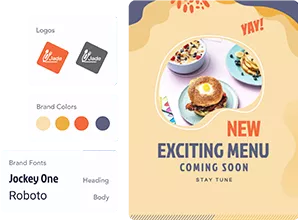
A banner works hardest when your thumbnails, posts, and profile all match it. Save your logo, colors, and fonts in Brand Kits and apply them in two clicks. Then resize the same artwork into YouTube thumbnail templates and social posts, and schedule them to YouTube without leaving the app. One look, everywhere your channel shows up.

ทำไมถึงต้องใช้ PosterMyWall

How to make YouTube channel art

  1. เริ่มต้นใช้งานได้ฟรี

    เปิด PosterMyWall บนเดสก์ท็อป มือถือ หรือแท็บเล็ตของคุณเพื่อเริ่มต้นใช้งานได้ฟรี

  2. เลือกเทมเพลตการออกแบบ

    เลือกจากเทมเพลตที่ออกแบบอย่างมืออาชีพนับพันรายการสำหรับธุรกิจ อีเวนต์ หรือโอกาสใดๆ

  3. ปรับแต่งเทมเพลตของคุณแบบเฉพาะบุคคลด้วยเครื่องมือที่ใช้ง่าย

    เพิ่มโลโก้ ภาพ วิดีโอ แบบอักษร สติ๊กเกอร์ คลิปเสียง และอื่นๆ ใช้ ชุดแบรนด์ สำหรับการออกแบบที่สอดคล้องและตรงตามแบรนด์

  4. ดาวน์โหลดการออกแบบของคุณ

    Download for free or purchase high-res files. Upgrade to PosterMyWall Premium plans for unlimited high quality image and video downloads, plus the full AI suite.

  5. แชร์ทุกที่ทุกเวลา

    เผยแพร่ไปยัง Facebook, X (Twitter), Instagram หรือส่งผ่านแคมเปญอีเมล ฝังบนเว็บไซต์ หรือ แสดงบนหน้าจอดิจิทัล

แพลตฟอร์มการตลาดที่ขับเคลื่อนด้วย AI แบบครบวงจร

สร้าง แชร์ และติดตามในที่เดียว

การตลาดง่ายๆ เริ่มต้นที่นี่

การตลาดโซเชียลมีเดียที่ง่ายดาย

  • สร้างวิดีโอโซเชียลมีเดียที่ทันสมัยด้วยไทม์ไลน์ และคำบรรยาย AI แล้วแชร์ได้เลย!
  • สร้างคำบรรยายอย่างรวดเร็วด้วย ผู้เขียน AI ของเรา - ไม่ต้องมีปัญหาคิดไม่ออกอีกต่อไป
  • เผยแพร่โพสต์และสตอรี่บนโซเชียลทั้งหมดในคลิกเดียว ซึ่งจะช่วยให้คุณเข้าถึงได้มากขึ้นอย่างไม่เคยมีมาก่อน!
  • กำหนดเวลาโพสต์ไปยังโซเชียลทั้งหมดของคุณล่วงหน้า เพียงตั้งค่าแล้วลืมไปได้เลย
  • สร้างวิดีโอด้วยไทม์ไลน์และคำบรรยาย AI
  • สร้างคำบรรยายอย่างรวดเร็วด้วย ผู้เขียน AI ของเรา - ไม่ต้องมีปัญหาคิดไม่ออกอีกต่อไป
  • เผยแพร่โพสต์และสตอรี่บนโซเชียลทั้งหมดในคลิกเดียว
  • กำหนดเวลาโพสต์ไปยังโซเชียลทั้งหมดของคุณล่วงหน้า ตั้งค่าแล้วลืมไปได้เลย
การตลาดง่ายๆ เริ่มต้นที่นี่

อีเมลแบบไม่ต้องเขียนโค้ดสำหรับผู้ใช้ที่ไม่ต้องเขียนโค้ด

  • เลือกจาก เทมเพลตอีเมล ที่ออกแบบอย่างมืออาชีพกว่า 3,600 รายการ
  • ปรับแต่งด้วยเทมเพลตส่วน สไตล์ แท็กผสาน และอื่นๆ อีกมากมาย
  • ส่งอีเมลได้สูงสุด 10,000 ฉบับต่อเดือน
  • สร้างแบบฟอร์มลงทะเบียนอีเมลเพื่อขยายรายชื่อของคุณ
การตลาดง่ายๆ เริ่มต้นที่นี่

ออกแบบด้วยเครื่องมือง่ายๆ

  • ปลดล็อกการดาวน์โหลดภาพ และวิดีโอความละเอียดสูงได้ไม่จำกัด
  • สร้างภาพถ่ายสินค้าที่น่าดึงดูดด้วย เครื่องมือลบพื้นหลัง AI
  • สรรค์สร้างจินตนาการของคุณให้เป็นจริงด้วย ภาพ AI
  • สร้างแบรนด์ที่สอดคล้องกันอย่างรวดเร็วด้วย ชุดแบรนด์
  • ปลดล็อกการดาวน์โหลดภาพและวิดีโอความละเอียดสูงได้ไม่จำกัด
  • สร้างภาพถ่ายผลิตภัณฑ์ที่น่าดึงดูดด้วย เครื่องมือลบพื้นหลัง AI
  • สรรค์สร้างจินตนาการของคุณให้เป็นจริงด้วย ภาพ AI
  • สร้างแบรนด์ที่สอดคล้องกันอย่างรวดเร็วด้วย ชุดแบรนด์ และแบบอักษรที่กำหนดเอง
การตลาดง่ายๆ เริ่มต้นที่นี่

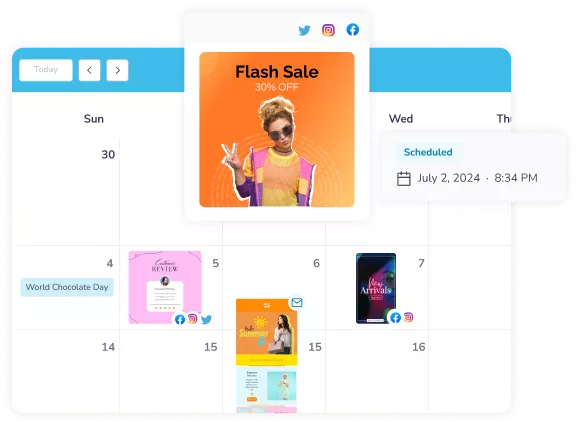
ปรับปรุงกำหนดเวลาการตลาดของคุณ

  • จัดตารางกำหนดการโพสต์โซเชียลมีเดีย และการส่งอีเมลไว้ในภายหลัง
  • วางแผนแคมเปญในปฏิทินเดียว และติดตามความคืบหน้า
  • ไม่พลาดโอกาสทางการตลาดอีกต่อไป
  • กำหนดเวลาโพสต์และอีเมลสำหรับภายหลัง
  • วางแผนแคมเปญในปฏิทินเดียวและติดตามความคืบหน้า
  • ไม่พลาดโอกาสทางการตลาดอีกต่อไป
การตลาดง่ายๆ เริ่มต้นที่นี่

สร้างกระแสให้กับอีเวนต์ครั้งต่อไปของคุณ

  • ดึงดูดผู้คนด้วยหน้าอีเวนต์ที่กำหนดเองได้ไม่จำกัด
  • สร้างคำอธิบายอีเวนต์ที่น่าตื่นเต้นด้วย ผู้เขียน AI
  • เผยแพร่อีเวนต์ของคุณบนโซเชียลทั้งหมดได้ทันที
  • โปรโมตอีเวนต์ของคุณด้วยอีเมลที่พร้อมส่ง
  • ดึงดูดผู้คนด้วยหน้าอีเวนต์ที่กำหนดเองได้ไม่จำกัด
  • สร้างคำอธิบายอีเวนต์ที่น่าตื่นเต้นด้วย ผู้เขียน AI
  • เผยแพร่อีเวนต์ของคุณบนโซเชียลทั้งหมดได้ทันที
  • โปรโมตอีเวนต์ของคุณด้วยอีเมลที่พร้อมส่ง
การตลาดง่ายๆ เริ่มต้นที่นี่

การตลาดที่ชาญฉลาดขึ้นด้วย AI

สำรวจเทมเพลตงานออกแบบเพิ่มเติม

คำถามที่พบบ่อย

What size should a YouTube banner be?

The recommended YouTube banner size is 2560 x 1440 pixels, saved as a JPG or PNG under 6MB. YouTube accepts a minimum of 2048 x 1152 pixels, but the larger file stays sharp on TV screens. Every channel art template on PosterMyWall is already set to 2560 x 1440.

What is the YouTube channel art safe area?

The YouTube channel art safe area is the centered 1546 x 423 pixel strip that shows on every device. Keep your channel name, logo, and tagline inside it, and treat the space around it as background. PosterMyWall templates place the key text inside that strip for you.

Why does my YouTube banner look cropped on mobile?

Your banner looks cropped on mobile because YouTube shows only the middle slice of your 2560 x 1440 image on small screens. Text near the top, bottom, or outer edges disappears. Move everything you need people to read into the centered 1546 x 423 safe area and it will show up everywhere.

Can I make a free YouTube banner?

Yes, you can make a free YouTube banner on PosterMyWall. Open a channel art template, customize the text, colors, and photos, then download it at no cost. A free account covers the editor and the template library. PosterMyWall Premium plans add unlimited high-resolution downloads and the full AI suite.

What is the difference between YouTube channel art and a YouTube banner?

YouTube channel art and a YouTube banner are two names for the same image, the wide graphic across the top of your channel page. Some people call it a channel header or cover photo instead. All of them use the same 2560 x 1440 pixel size and the same safe area.

How do I upload a banner to my YouTube channel?

To add your banner, open YouTube Studio, go to Customization, then Branding, and upload your image under Banner image. YouTube shows a preview across TV, desktop, and mobile before you publish. Download your finished design from PosterMyWall as a JPG or PNG and upload it there.

Can AI make a YouTube banner background?

Yes, describe the look you want and PosterMyWall AI builds a banner background for you, ready to edit. You can also generate a custom image with AI Images and place it behind your channel name. Both options open in the same editor as the ready-made templates.

Are there gaming YouTube banner templates?

Yes, PosterMyWall has gaming YouTube banner templates alongside vlog, music, fitness, beauty, cooking, and travel designs. Search the channel art gallery by your topic, then change the colors and fonts to match your channel. You can also drop in your own screenshots and logo.

Can I make a YouTube banner on my phone?

Yes, PosterMyWall works in any browser and in the free iOS and Android apps, so you can design a banner on your phone or tablet. Your work syncs across devices, which means you can start a design on your laptop and finish it on your phone.

How often should I update my channel banner?

Refresh your channel banner every few months, or whenever your content focus, upload schedule, or branding changes. Seasonal promotions and new series are good reasons too. Duplicate your existing design in PosterMyWall, change the artwork and text, then upload the new version in a couple of minutes.

เปรียบเทียบ PosterMyWall






